Written for university students in the UK and internationally. Conventions and terms vary between countries and institutions, so your own course handbook and your tutor’s guidance are always the final authority.
The methodology chapter is where many dissertations quietly lose marks. Students pour their energy into the literature review and the findings, then treat the methodology as an administrative box to tick: here is what I did. In truth the chapter has to do two things — it both describes the procedures you followed and justifies the decisions behind them — and it is the justification that students most often leave out. Get that balance right and the chapter becomes one of the strongest in your dissertation.
What the chapter has to achieve
A good methodology chapter does two things at once. First, it justifies every choice, so the reader sees that your design is a sound way to answer your research question, not just one you happened to pick. Second, it gives enough detail for a reader to follow and evaluate what you did — and, in quantitative work, ideally to repeat it. If a reader finishes your methodology and could neither judge why you made your choices nor understand exactly what you did, the chapter has not done its job, however long it is.
The components most chapters include
Methodology chapters vary by discipline, but most are built from the same building blocks: your overall research approach and why it fits your question; your research design and methods; who or what you studied and how you selected them; the instruments or materials you used; the procedure you followed to collect data; how you analysed that data; your ethical considerations; and an honest account of the limitations. Treat this as a checklist of components to adapt, not a rigid template — your programme may want a particular order or emphasis, so follow its guidance where it differs.
Component
What to include
Key question it answers
Approach & design
Qualitative, quantitative or mixed, and the design within it
Why is this a sound way to answer my question?
Participants & sampling
Who you studied; how and why you selected them
Who did I study, and why them?
Data collection
Instruments, materials and the exact procedure
What did I do, step by step?
Analysis
How the data was prepared and analysed
How did I turn data into findings?
Ethics & limitations
Consent, data handling, and honest constraints
How did I protect participants, and what are the limits?
An illustrative skeleton. Adapt the components and their order to your discipline and your programme’s requirements.
Justify every choice, do not just announce it
The habit that separates a strong methodology from a weak one is justification. Each major decision should follow the pattern “I did X because…”. I chose semi-structured interviews because they let participants raise issues I had not anticipated while keeping the discussion on topic. I used purposive sampling because I needed participants with direct experience of the policy. Every unjustified choice is a question you are handing to your examiner, and in a viva those questions come back to you directly, so it is far better to answer them in writing first.
Write it so a reader can follow and judge it
Giving enough detail is a useful test whatever your approach, but what “enough” means depends on the tradition. In quantitative work it points toward replicability: how many participants, how they were recruited, over what period, and exactly how the data were analysed, so that another researcher could in principle repeat the study. In interpretive work an identical repeat is rarely the aim; there the goal is transparency — enough about the context, your procedures and your own role and reflexivity that a reader can see how you reached your interpretations and judge them fairly. Either way, detail is not padding; it is what lets a reader trust your findings.
Be honest about limitations
Every study has limitations, and naming them is a strength, not a confession of failure. A small sample, a single site, self-reported data, a short timeframe — state them plainly and explain how you minimised their impact and what they mean for how far your findings can be generalised. Examiners are far more reassured by a student who understands the limits of their own work than by one who writes as though their study were flawless. What they are assessing is your judgement, and honest limitations demonstrate it.
Handle research philosophy without drowning in jargon
Many methodology chapters open with a dense passage on research philosophy — positivism, interpretivism, pragmatism — copied almost verbatim from a textbook. Examiners see through this quickly. Rather than forcing your study under a label, state the assumptions you are actually making about what counts as evidence and how you can know it, and show that they fit your question. Those assumptions often sit loosely within traditions like positivism or interpretivism, but the link is not automatic — a questionnaire is not “positivist” by itself, and interviews are not “interpretivist” by themselves. Naming the assumptions you rely on matters more than naming the school, so keep this section short, in your own words, and tied to your project.
Show how you protected quality
A strong methodology explains not just what you did but how you kept it trustworthy. In quantitative work this means reliability and validity — whether your measures are consistent and whether they capture what you intended. In qualitative work it means credibility and transparency — for example keeping an audit trail of your coding, or checking interpretations with participants where appropriate. You do not need every technique in the book, but naming the specific steps you took to make your findings dependable turns a merely descriptive chapter into a convincing one.
Write in the tense that fits your stage
In a completed dissertation, a small but telling sign of a mature methodology chapter is that it reports what you did, in the past tense, rather than describing methods in general or in the conditional: participants were recruited through, data were analysed using. (In a proposal, by contrast, you are describing procedures you plan to carry out, so the future or conditional is the right choice there.) Writing about your own study, rather than a textbook account of the method, keeps the focus where the marks are. Save general definitions for a single brief sentence where they are genuinely needed.
Keep it aligned from question to findings
The methodology sits in the middle of your dissertation and should connect cleanly to both sides. It must answer the research question you set earlier, and it must produce exactly the kind of data your findings chapter then analyses. As an illustration, the chain should hold together: a question about why first-year students disengage from online classes leads to purposive sampling of first-years who have disengaged, to semi-structured interviews, to thematic analysis, to limitations acknowledging a single institution and a small sample. Each link follows from the one before. A quick check that your own chain holds — question, sampling, collection, analysis, limitations — catches the inconsistencies examiners notice immediately and that are painful to fix once the dissertation is built around them.
Further reading: a standard research-methods text, such as Creswell and Creswell’s Research Design, sets out these components and choices in more detail.
A second read of your methodology
Because you know why you did things, it is hard to see where the page fails to say so; a reader who does not share that knowledge spots the gaps quickly. Students who want that perspective can use fizbusinessolutions.com to check whether a methodology is clearly justified and internally consistent, with the scope agreed beforehand and their university’s rules observed. A chapter that explains its own reasoning is also the best possible preparation for defending it in a viva.
Black’s Beach in La Jolla, California, is known for its dramatic cliffs, sandy shoreline, and powerful Pacific Ocean waves. Beyond its scenic beauty, the surrounding coast supports a variety of wildlife, including shorebirds, marine invertebrates, and ocean species that depend on healthy coastal habitats. Protecting Black’s Beach wildlife is an important responsibility for visitors, surfers, photographers, and local residents who want to preserve this unique environment for future generations.
Small actions can make a meaningful difference. By reducing litter, observing animals from a distance, respecting coastal habitats, and following local regulations, every visitor can help protect the natural beauty of Black’s Beach.
Why Coastal Wildlife Protection Matters
Coastal ecosystems connect the beach, cliffs, ocean, and nearby marine habitats. Shorebirds use sandy and rocky areas to find food, while marine invertebrates live in tide pools and other intertidal environments. Offshore waters support fish and other marine life.
The California Department of Fish and Wildlife describes the nearby San Diego-Scripps coastal region as an important habitat for shorebirds, tide-pool organisms, fish, and other marine species. These examples illustrate the ecological value of the wider La Jolla coastline. <Cite refs={[“turn550058search1”]}/>
Pollution, habitat disturbance, and careless recreation can damage these environments. Protecting coastal wildlife helps maintain biodiversity and keeps the shoreline healthier for people and animals alike.
1. Keep the Beach Clean and Litter-Free
Plastic wrappers, food packaging, fishing line, and other rubbish can injure wildlife or be mistaken for food. Waste may also wash into the ocean, where it can harm marine animals and contribute to long-lasting pollution.
Follow these simple practices when visiting Black’s Beach:
Carry a reusable water bottle and reusable bags.
Pack a small bag for collecting your own rubbish.
Take all food scraps and packaging with you when leaving.
Never leave fishing line, plastic, or other debris on the sand.
Join organized beach cleanups when available.
Even biodegradable food scraps should not be left behind. They can attract animals to human food and alter their natural feeding behavior.
2. Observe Wildlife Without Disturbing It
Seeing a shorebird or marine animal in its natural habitat can be a memorable experience. However, getting too close can cause stress, interrupt feeding, or force an animal to abandon a resting place.
Use binoculars or a camera with a zoom lens instead of approaching wildlife for a closer photograph. Never chase birds, surround animals, or encourage children to touch them.
If an animal changes its behavior because of your presence, move farther away. Give wildlife a clear path to the water and avoid blocking routes between resting and feeding areas.
Responsible wildlife watching allows visitors to enjoy nature while giving animals the space they need to survive.
3. Protect Tide Pools and Marine Life
Rocky tide pools along the wider La Jolla coast contain small organisms such as snails, crabs, barnacles, and sea anemones. These animals are adapted to particular conditions and can be harmed by handling, trampling, or removal.
When exploring intertidal areas, step carefully on bare, stable surfaces where permitted, and avoid stepping on organisms or delicate seaweed. Do not collect shells containing living animals, remove marine life, or turn over rocks unnecessarily.
Some nearby tide pools are within designated marine protected areas, where collecting living marine resources is prohibited. Check the boundaries and applicable rules before exploring. <Cite refs={[“turn550058search9″,”turn550058search1”]}/>
4. Respect Coastal Cliffs and Natural Habitats
The steep bluffs above Black’s Beach are an important part of its natural landscape, but they are unstable and can experience sudden slides. The City of San Diego warns visitors to stay well away from the cliff base. <Cite refs={[“turn550058search0”]}/>
For your safety and the protection of the coastal environment:
Stay on authorized, open access routes.
Never create shortcuts through vegetation or unstable ground.
Avoid disturbing plants or digging into the sand dunes and bluff edges.
Keep beach activities away from sensitive areas identified by signs or barriers.
Following designated routes reduces the risk of accidents and limits unnecessary damage to coastal habitats.
5. Follow Wildlife-Friendly Rules for Pets and Recreation
Dogs and other pets can frighten birds, disturb resting wildlife, and damage sensitive areas. Black’s Beach has specific restrictions, including a prohibition on dogs, so check the current rules before bringing a pet. <Cite refs={[“turn550058search0”]}/>
Surfers, swimmers, and beach walkers can also help by avoiding wildlife gathering areas and disposing of any equipment or rubbish responsibly. Never feed wild animals, because human food can change their behavior and create unhealthy dependence.
6. Support Local Conservation Efforts
Protecting Black’s Beach wildlife requires cooperation between visitors, local organizations, and public agencies. You can contribute by joining a reputable coastal cleanup, sharing responsible recreation advice, or reporting injured wildlife and hazardous pollution to the appropriate local authority.
If you encounter a marine mammal or bird that appears injured, do not attempt to handle or move it. Keep your distance and contact qualified wildlife responders or local authorities for guidance.
You can also learn more about coastal conservation through the and follow local beach management updates before visiting.
Frequently Asked Questions
What wildlife can visitors see near Black’s Beach?
Wildlife along the wider La Jolla coast may include shorebirds, crabs, snails, fish, and other marine organisms. The species visible on a particular day depend on the season, tides, and local conditions.
How can visitors protect wildlife at Black’s Beach?
Take rubbish home, keep a respectful distance from animals, avoid disturbing tide pools, follow posted rules, and stay on authorized access routes.
Is it safe to touch marine animals in tide pools?
It is best to observe without touching. Handling can injure sensitive organisms, and collecting marine life may be prohibited in protected areas.
Conclusion
Protecting Black’s Beach wildlife starts with responsible choices. Keeping the shoreline clean, respecting animals, avoiding sensitive habitats, and following local regulations can help preserve the ecological value of this remarkable stretch of the La Jolla coast.
Whether you are visiting for surfing, photography, or a peaceful walk, leave the beach as you found it—and give its wildlife the space and protection it deserves.
The internet gives students access to millions of articles, research papers, educational websites, videos, and digital libraries. This makes school research easier, but it also creates a challenge: not every online source contains accurate, trustworthy, or relevant information.
Learning how to evaluate online sources for research is an essential academic skill. It helps students distinguish facts from opinions, identify misleading claims, verify evidence, and select information that strengthens their assignments. Without these skills, even a well-written research paper may rely on outdated information or unreliable websites.
Whether you are preparing a school project, writing a university essay, or researching a presentation, you need to know which sources deserve your trust.
In this guide, you will learn how to evaluate online information, use practical source-checking methods, recognise warning signs, and build a reliable research process.
Why Is It Important to Evaluate Online Sources?
Finding information online is easy, but deciding whether that information is dependable requires critical thinking. Websites may publish inaccurate claims, use outdated statistics, present personal opinions as facts, or promote products through biased content.
Using unreliable sources can weaken your arguments, lead to incorrect conclusions, and reduce the quality of your academic work.
Evaluating sources helps you:
Support assignments with credible evidence.
Identify misinformation and misleading claims.
Understand different perspectives on a topic.
Recognise bias and conflicts of interest.
Avoid plagiarism by tracing information to its original source.
Develop stronger research and critical thinking skills.
A reliable source is not necessarily one that agrees with your opinion. It is one whose information can be examined, verified, and judged appropriate for your particular research question.
1. Check Who Wrote the Information
The author is one of the first things you should investigate when evaluating an online source.
Look for the author’s name, qualifications, professional experience, and relevant publications. Consider whether the person has the knowledge needed to discuss the subject accurately.
For example, a medical research article written by a qualified researcher may be more suitable for an assignment about public health than an anonymous blog post making medical claims without evidence.
However, credentials alone do not guarantee accuracy. Experts can make mistakes, and qualified individuals may have conflicts of interest. You should still examine the evidence supporting their claims.
Ask yourself:
Is the author’s identity clearly stated?
Does the author have relevant knowledge or experience?
Can I verify the author’s background independently?
Has the author published other credible work on this topic?
If the author is not named, investigate the organisation responsible for publishing the information. An anonymous source may still provide useful material, but you should be more cautious before relying on it for an important academic claim.
2. Investigate the Website or Publisher
The organisation publishing an article can provide useful clues about its reliability and purpose.
Universities, government agencies, research institutions, established news organisations, and professional bodies may provide valuable information. Nevertheless, you should assess the specific page rather than assuming every publication from a particular type of organisation is automatically trustworthy.
Check the website’s About page, editorial standards, contact information, and publishing practices. Then search independently for information about the organisation.
This is known as lateral reading: instead of relying only on what a website says about itself, you open other sources to investigate its reputation and credibility.
For example, if an unfamiliar website publishes a surprising scientific claim, search for the organisation’s name alongside terms such as “research,” “fact-check,” or “review.” See whether independent sources confirm its expertise or raise concerns about its practices.
Also remember that domain endings are not proof of credibility. A .org website is not automatically unbiased, and a .com website is not automatically unreliable. Examine the publisher, evidence, and purpose together.
3. Check the Publication Date
Information can become outdated, especially in fields such as technology, medicine, economics, and environmental science.
Before using a source, look for its publication date and any information about when it was last updated. Then decide whether the date matters for your research question.
For example, an assignment about current cybersecurity threats requires recent information. A history assignment about an ancient civilisation may rely on older scholarly works that remain valuable today.
Ask these questions:
When was the information first published?
Has the page been updated?
Are its statistics or references still relevant?
Does my research topic require current evidence?
Be careful with pages that display a recent update date but still rely on old information. If the publication date matters, check the dates of the studies, statistics, and events discussed in the article.
4. Verify Facts and Supporting Evidence
A trustworthy source should provide a reasonable basis for its claims. Look for research findings, statistics, expert analysis, primary documents, or references that allow readers to investigate the evidence.
Do not accept a claim simply because it sounds convincing or appears in a professionally designed article.
For example, if a website claims that a particular study method improves examination results, look for the research behind that statement. Does the article identify the study? Does the evidence actually support the conclusion? Are limitations acknowledged?
When checking evidence:
Look for citations, references, and links to original research.
Confirm that quoted material has not been taken out of context.
Check whether statistics identify their source and time period.
Distinguish evidence from speculation or personal experience.
Compare important claims with independent sources.
If you cannot verify a central claim, avoid presenting it as an established fact in your assignment. You may need to find a stronger source or explain that the evidence is uncertain.
5. Understand the Purpose and Possible Bias
Every source has a purpose. An article might aim to educate, report news, persuade readers, sell a product, entertain an audience, or promote a particular viewpoint.
Understanding this purpose helps you assess how information is presented.
For example, a company publishing a report about its own product may provide useful technical details but may also emphasise benefits while giving less attention to limitations. A campaign website may offer information about an issue from a particular perspective.
Bias does not automatically make a source useless. It means you should understand the perspective and consider whether it affects the claims being made.
Ask yourself:
Is the source trying to inform, persuade, or sell?
Does it clearly distinguish facts from opinions?
Does it acknowledge evidence that challenges its position?
Who funds or sponsors the content?
Does the language rely on emotional appeals rather than evidence?
Using sources with different perspectives can help you build a more balanced understanding of a research topic.
6. Use the CRAAP Test to Evaluate Online Sources
The CRAAP test is a useful framework for checking five aspects of a source: Currency, Relevance, Authority, Accuracy, and Purpose.
Is the information recent enough for my topic? Has it been updated?
Relevance
Does it directly answer my research question? Is it appropriate for my academic level?
Authority
Who wrote or published it? Do they have relevant expertise?
Accuracy
Is the information supported by verifiable evidence? Can I confirm the claims?
Purpose
Why was it published? Could commercial interests or bias influence it?
You can use this checklist when comparing several potential sources for a school assignment.
For example, imagine you are researching the effects of online learning. One article may be recent and relevant but provide no research evidence. Another may be a peer-reviewed study with a clear methodology but examine a different age group. A third may be a university report that explains its findings and limitations.
The best choice depends on your research question, the quality of the evidence, and how closely the source applies to your topic. The CRAAP test helps you make that decision systematically rather than relying on appearance or popularity.
7. Compare Information Across Multiple Sources
One website should rarely be your only source for an important research claim. Comparing information helps you identify errors, understand disagreements, and discover better evidence.
Try to find at least two or three independent sources that address your central question. Where appropriate, combine scholarly research, official statistics, expert explanations, and primary documents.
However, several websites repeating the same claim do not necessarily provide independent confirmation. They may all be quoting one original article or repeating the same mistake.
Whenever possible, trace the claim back to its original source.
If two credible sources disagree, investigate why. They may use different data, study different populations, cover different time periods, or reach different conclusions because of their methods.
Your goal is not to find several pages that say the same thing. It is to understand what the available evidence supports and where uncertainty remains.
8. Recognise Red Flags in Unreliable Sources
Some warning signs suggest that a website or article needs closer investigation.
Be cautious when you encounter:
Sensational headlines that promise shocking discoveries.
Claims that are unsupported by evidence or references.
Anonymous authors discussing specialised subjects without explanation.
Statistics with no identifiable source.
Excessive spelling errors or unclear writing.
Emotional language designed to provoke an immediate reaction.
Fake-looking testimonials or unverifiable expert endorsements.
Headlines that make stronger claims than the article supports.
These signs do not automatically prove that a source is false. A reliable source may contain minor errors, and a misleading source may look professional. Evaluate the content, evidence, and publisher together.
If a claim makes you feel angry, frightened, or unusually excited, pause before accepting or sharing it. Strong emotional reactions can make it easier to overlook weaknesses in the evidence.
9. Check Sources When Using AI-Generated Information
AI tools can help students brainstorm topics, understand unfamiliar concepts, and identify possible research directions. However, AI-generated answers should not automatically be treated as reliable academic sources.
An AI tool may provide incorrect information, misrepresent a study, or generate references that do not exist. It may also omit important context or present an uncertain claim with excessive confidence.
When using AI during research:
Treat its suggestions as starting points rather than final evidence.
Search for the original article, report, or research paper.
Confirm that the source actually exists and supports the claim.
Read the relevant section instead of relying only on a summary.
Follow your school’s or university’s rules for AI use and disclosure.
For academic assignments, cite the original source when you have consulted it and your institution’s rules call for that citation. Do not cite a research paper simply because an AI tool mentioned it.
AI can support your research process, but the responsibility for verifying your evidence remains yours.
10. Decide Whether a Source Is Suitable for Your Assignment
A source can be accurate without being the right source for a particular assignment.
A personal blog might be useful when analysing individual experiences. A government report may be more suitable for official statistics. A peer-reviewed research paper may be appropriate when discussing scientific findings.
Before including a source, consider whether it matches the type of evidence your assignment requires.
For example:
School essays: Use credible educational resources, books, research, and relevant primary sources.
University research papers: Prioritise scholarly literature and authoritative sources appropriate to the discipline.
Current affairs projects: Check reputable reporting, original statements, and relevant official data.
Historical research: Look for primary documents and scholarly interpretations.
Scientific assignments: Evaluate research methods, evidence, limitations, and publication quality.
Follow your teacher’s instructions about acceptable sources. If you are unsure whether a source is suitable, ask your teacher or librarian before building your argument around it.
A Simple Online Source Evaluation Checklist
Before using a webpage in your assignment, review these questions:
Can I identify the author or responsible organisation?
Is the source relevant to my research question?
Is the publication date appropriate for my topic?
Are the claims supported by evidence or references?
Can I verify important information independently?
Do I understand the source’s purpose and possible bias?
Have I compared the information with other credible sources?
Have I traced important claims to their original context?
Can I cite the source accurately using my required referencing style?
If you cannot answer several of these questions, investigate further before relying on the source. You do not need to reject every imperfect source, but you should understand its limitations and use it appropriately.
Frequently Asked Questions
How can students evaluate online sources quickly?
Start by checking the author, publisher, date, evidence, and purpose. Then search independently for information about the source and compare its main claims with reliable alternatives. Spend more time checking sources that support important or controversial arguments.
What makes an online source credible?
Credible sources generally provide identifiable authors or publishers, relevant expertise, verifiable evidence, appropriate context, and transparent information about their purpose. Credibility also depends on whether the source is suitable for the specific research question.
Are university websites always reliable?
University websites can provide valuable educational and research material, but not every page has the same purpose or level of review. Check the author, evidence, publication date, and whether the content is an official research publication, an expert explanation, or an individual’s opinion.
Is Wikipedia suitable for school research?
Wikipedia can be a useful starting point for understanding a topic and finding references. However, your teacher may require more authoritative sources for the final assignment. Check the references provided and consult the original sources before citing specific claims.
How many sources should I use for a school assignment?
The appropriate number depends on the assignment instructions, topic, and required depth. A short project may need only a few strong sources, while a university research paper may require a much larger selection. Prioritise relevance, quality, and variety rather than collecting sources simply to increase the number.
What should I do if two reliable sources disagree?
Compare their dates, methods, evidence, and scope. Check whether they are discussing the same question or using different definitions and populations. If the disagreement cannot be resolved, acknowledge the uncertainty and represent each source fairly.
Conclusion
Learning how to evaluate online sources for research helps students produce stronger assignments, avoid misinformation, and develop independent critical thinking skills.
Before using information, check who created it, investigate the publisher, review the publication date, verify the evidence, and consider the source’s purpose. Use frameworks such as the CRAAP test to organise your evaluation, and practise lateral reading to investigate unfamiliar websites beyond their own descriptions.
Most importantly, do not rely on a source simply because it appears professional or agrees with your opinion. Compare evidence, trace important claims to their original context, and select information that genuinely supports your research question.
With regular practice, evaluating online sources becomes a natural part of studying. It helps you become a more confident researcher, a more careful reader, and a more responsible user of digital information.
Digital technology has become an essential part of modern education. Students use computers, smartphones, online learning platforms, digital libraries, and educational applications to complete assignments, communicate with teachers, and explore new ideas. However, using digital devices regularly does not automatically mean someone knows how to use them effectively.
Developing digital literacy skills for students is essential for academic success, responsible online behaviour, and lifelong learning. These skills help students find reliable information, evaluate online sources, protect their personal data, communicate professionally, and use technology to solve problems.
Digital literacy goes beyond knowing how to operate a computer. It involves understanding how digital information works, recognising potential risks, creating useful content, and making thoughtful decisions when using technology.
In this guide, you will learn about 12 important digital literacy skills every student should develop, why they matter, and how to practise them in everyday academic life.
What Is Digital Literacy?
Digital literacy is the ability to use digital technologies confidently, effectively, critically, and responsibly. It includes finding information, evaluating its accuracy, communicating online, creating digital content, protecting personal information, and solving problems with technology.
For students, digital literacy means knowing how to do more than search for an answer. It means understanding whether the information is trustworthy, recognising bias, respecting copyright, and using digital tools to support genuine learning.
For example, a digitally literate student researching a school assignment does not simply copy the first search result. Instead, the student checks the author’s credibility, compares multiple sources, records references, and presents the findings in their own words.
These abilities are useful across subjects, from science and mathematics to literature, business, and university research.
Why Are Digital Literacy Skills Important for Students?
Digital literacy helps students participate more effectively in education and prepare for a world where technology plays a significant role in work and daily life.
Here are some important benefits:
Better academic research: Students learn to find relevant, accurate, and trustworthy information.
Improved productivity: Digital tools help organise notes, manage deadlines, and complete assignments.
Stronger communication: Students can collaborate with classmates and communicate professionally with instructors.
Greater online safety: Awareness of privacy, scams, and cybersecurity helps protect personal information.
Responsible technology use: Students learn to respect copyright, avoid plagiarism, and use AI appropriately.
Career preparation: Digital competence supports the development of skills used in many modern workplaces.
Digital literacy also encourages independent learning. Students who can identify reliable resources and use educational platforms effectively can continue developing their knowledge beyond the classroom.
12 Essential Digital Literacy Skills for Students
1. Effective Online Research
Online research is one of the most important digital literacy skills for students. Search engines provide access to enormous amounts of information, but finding useful material requires more than entering a question into a search box.
Students should learn to use specific keywords, refine search queries, and identify sources that match their research topic.
For example, searching for “climate change” may produce millions of results. Searching for “effects of climate change on coastal ecosystems research” is more focused and can help locate relevant material.
To improve online research skills:
Use specific keywords related to your assignment.
Explore educational websites, digital libraries, and academic publications.
Check publication dates when current information matters.
Compare findings across multiple sources.
Record useful references while researching.
Effective research saves time and helps students build stronger, evidence-based assignments.
2. Evaluating Online Information
Not everything published online is accurate. Websites may contain outdated information, misleading headlines, personal opinions presented as facts, or deliberately false claims.
Students need to evaluate information before relying on it in their coursework.
Use these questions when assessing a source:
Who created it? Look for the author’s qualifications and relevant experience.
What evidence is provided? Check whether claims are supported by data, research, or credible references.
When was it published? Determine whether the information is still relevant.
Why was it created? Consider whether the purpose is to inform, persuade, entertain, or sell something.
Can the claims be verified? Compare important statements with independent sources.
A professional-looking website is not automatically trustworthy. Learning to assess evidence and recognise bias helps students avoid spreading misinformation and improves the quality of academic work.
3. Basic Computer and Software Skills
Students frequently use digital tools to write essays, create presentations, analyse data, and manage coursework. Basic computer skills make these tasks easier and more efficient.
Important skills include creating and organising files, managing folders, using word processors, working with spreadsheets, and preparing presentations.
Students should also understand how to save documents in appropriate formats, rename files clearly, back up important work, and manage downloads.
For example, naming a document “Biology_Assignment_Final” is more useful than saving every file as “Document1.” Organised files reduce confusion when deadlines approach.
Start by mastering the software required for your courses. You can then explore additional tools that support your academic interests and future career plans.
4. Online Communication and Collaboration
Digital communication allows students to work together even when they are not physically in the same location. Email, discussion forums, shared documents, and video conferencing are common parts of modern education.
However, effective online communication requires more than knowing how to send a message.
Students should learn to:
Write clear, respectful emails to teachers and classmates.
Use appropriate language in academic discussions.
Participate constructively in online group projects.
Share documents and manage permissions correctly.
Respond to feedback professionally.
Respect other people’s time and contributions.
When emailing an instructor, include a clear subject line, explain your question briefly, and use a polite greeting. During group projects, agree on responsibilities and deadlines to prevent misunderstandings.
Strong digital communication skills support teamwork and help students build professional habits.
5. Cybersecurity and Password Management
Online safety is a fundamental part of digital literacy. Students may use multiple platforms containing personal details, educational records, messages, and payment information.
Weak passwords and careless clicking can expose these accounts to unauthorised access.
To improve cybersecurity:
Use long, unique passwords for important accounts.
Consider a reputable password manager.
Enable multifactor authentication when available.
Keep your operating system and applications updated.
Avoid opening suspicious attachments or unexpected links.
Use trusted networks when handling sensitive information.
Be cautious of messages that create urgency, promise unexpected rewards, or request login details. These may be phishing attempts designed to steal personal information.
If a message claims to come from your school or university, verify it through an official channel before sharing sensitive information.
6. Protecting Personal Information and Privacy
Students often share information online without considering how widely it may be distributed. Photos, public posts, location details, and personal documents can reveal more than intended.
Privacy awareness helps students make informed decisions about what they share and with whom.
Review the privacy settings on your social media accounts and learning platforms. Share personal information only when necessary, and check who can access shared documents or online profiles.
Avoid posting confidential academic records, identification documents, passwords, or other sensitive information in public spaces.
It is also important to understand that online content may be copied or saved by others. Before publishing something, consider whether you would be comfortable with teachers, future employers, or unfamiliar people seeing it.
Protecting privacy does not mean avoiding the internet. It means using digital platforms thoughtfully and understanding the possible consequences of sharing information.
7. Digital Content Creation
Digital literacy includes the ability to create information, not just consume it. Students can demonstrate their understanding by producing presentations, reports, spreadsheets, videos, infographics, and other digital projects.
Content creation develops creativity, communication, and technical confidence.
For example, a student studying environmental science might create an infographic showing recycling statistics. Another student could prepare a presentation explaining a historical event or use a spreadsheet to analyse survey results.
When creating digital content, focus on accuracy, clarity, and accessibility. Use readable text, suitable visuals, consistent formatting, and appropriate data representations.
Remember to credit images, quotations, research, and other material you did not create yourself. Developing original content while respecting other people’s work is an important academic habit.
8. Copyright, Referencing, and Academic Integrity
Digital resources are easy to copy, but their availability does not mean they are free to use without restrictions.
Students should understand copyright, licences, plagiarism, and proper referencing. These concepts help protect creators’ rights and maintain academic honesty.
When using information from a website, book, research paper, image, or video, follow the citation requirements provided by your school or university.
Practical habits include:
Record source details while researching.
Put exact quotations in quotation marks and cite them.
Paraphrase ideas genuinely in your own words.
Credit images and other third-party content.
Check the licence before reusing digital materials.
Follow your institution’s rules for collaboration and AI tools.
Changing a few words from a source does not necessarily make the work original. Students should understand the material, express ideas accurately in their own words, and acknowledge the source.
9. Using AI Tools Responsibly
Artificial intelligence tools can support brainstorming, explanations, language practice, revision, and study planning. However, students need to understand both their capabilities and their limitations.
AI-generated answers can contain factual errors, fabricated references, biased information, or outdated claims. An answer that sounds confident is not necessarily correct.
To use AI responsibly:
Follow your institution’s rules on AI assistance.
Use AI to clarify concepts or generate practice questions.
Verify important claims using reliable sources.
Never invent citations or submit unverified output as fact.
Protect private information when using online tools.
Disclose AI assistance when required.
Make sure the submitted work reflects your own understanding.
AI should support learning rather than replace it. For example, asking an AI tool to explain a difficult concept and then solving practice questions independently is more educational than copying an answer without understanding it.
10. Managing Digital Files and Data
Students often handle lecture notes, assignments, research materials, photographs, and downloaded resources across multiple devices. Poor file management can lead to lost work and unnecessary stress.
Develop a simple system for organising digital materials.
Create separate folders for each subject and use clear filenames that include the topic or assignment. Store important work in a secure backup location, such as an approved cloud service or external storage device.
Learn basic data skills as well. Spreadsheets can help organise research findings, calculate results, create charts, and compare information.
When using cloud storage, check sharing permissions and avoid making private academic documents publicly accessible. Keep backup copies of important assignments before major deadlines.
Good digital organisation saves time and makes academic responsibilities easier to manage.
11. Identifying Digital Distractions and Managing Screen Time
Technology provides valuable learning opportunities, but social media, notifications, games, and entertainment websites can interrupt concentration.
Students should learn to control their digital environment instead of allowing every notification to demand attention.
Try these habits:
Silence unnecessary notifications during study sessions.
Close unrelated browser tabs.
Use website blockers if certain platforms repeatedly distract you.
Set specific times for checking messages.
Study in focused blocks with planned breaks.
Review your screen-time habits and adjust when necessary.
Also recognise the difference between productive and unproductive screen use. Watching an educational lecture or practising a skill online can be valuable, while repeatedly switching between unrelated apps may reduce your progress.
The goal is not to minimise all screen time. It is to use technology in ways that support your learning and wellbeing.
12. Troubleshooting and Problem-Solving
Digital tools do not always work as expected. Students may encounter software errors, connection problems, inaccessible files, or difficulties using unfamiliar platforms.
Basic troubleshooting skills help you resolve common problems independently.
Start by identifying the issue clearly. Check your internet connection, review error messages, restart the relevant application if appropriate, and consult official help documentation.
If a problem continues, search for a solution using the exact error message and the name of the software. Prefer official support pages or reputable technical resources over unfamiliar downloads.
Students should also learn to recognise when they need help. Contact your teacher, institution’s IT support team, or a qualified technician when a problem involves account access, security, or complex technical issues.
Problem-solving builds confidence and reduces dependence on others for routine digital tasks.
How Students Can Improve Digital Literacy Skills
You do not need to master every digital skill at once. A practical approach is to identify your weaknesses and practise regularly.
Follow this simple four-week plan:
Week
Skill focus
Practical activity
Week 1
Research and source evaluation
Compare three sources about one academic topic and explain which is most trustworthy.
Week 2
Productivity and organisation
Organise subject folders, create a study calendar, and back up an assignment.
Create a short presentation, cite your sources, and share it securely with a classmate.
At the end of each week, reflect on what you learned and identify one skill to improve next.
You can also ask teachers which digital tools are most relevant to your subjects. Practising with tools you actually need will make your learning more useful and manageable.
Frequently Asked Questions
What are the most important digital literacy skills for students?
Key skills include online research, evaluating information, using productivity software, communicating online, cybersecurity, privacy management, digital content creation, academic integrity, responsible AI use, file organisation, managing distractions, and troubleshooting.
Why is digital literacy important in education?
Digital literacy helps students access learning resources, evaluate information, collaborate with others, protect their personal data, and complete academic tasks effectively. It also supports independent learning and preparation for digital workplaces.
How can students develop digital literacy skills?
Students can practise by researching academic topics, learning productivity tools, checking online sources, improving account security, creating digital projects, and following copyright and privacy rules. Regular practice is more useful than simply knowing how a tool works.
Is digital literacy the same as computer literacy?
No. Computer literacy generally focuses on using computers and software. Digital literacy is broader and includes evaluating information, communicating online, creating content, protecting privacy, understanding digital risks, and using technology responsibly.
Do students need digital literacy if they already use smartphones?
Yes. Familiarity with social media or smartphone applications does not necessarily mean someone can evaluate research, protect personal information, recognise scams, or manage academic files. Digital literacy requires practical and critical skills, not simply frequent technology use.
How does digital literacy help students prepare for future careers?
Many careers involve digital communication, information management, online collaboration, and technology-based problem-solving. Students who develop these skills can adapt more confidently to workplace tools and continue learning as technology changes.
Conclusion
Developing digital literacy skills for students is essential for learning effectively, staying safe online, and preparing for future opportunities. Students need more than basic technical knowledge; they must also evaluate information critically, communicate responsibly, protect personal data, and use technology ethically.
Start with the skills most relevant to your studies. Improve your research habits, organise digital files, secure your accounts, and practise creating original work. As you gain confidence, expand your knowledge of AI tools, digital collaboration, and technical problem-solving.
Digital literacy is not a skill you learn once and forget. Technology continues to change, so the ability to evaluate new tools, learn independently, and make responsible decisions will remain valuable throughout your education and career.
Online courses make it easier than ever to learn new skills, explore academic subjects, and prepare for career opportunities. You can study from home, learn at your own pace, and choose from thousands of programmes offered by universities, educational platforms, and independent instructors. However, not every online course provides the quality, support, or value it promises.
Knowing how to choose a reliable online course can help you avoid wasting money, spending time on outdated materials, or earning a certificate that does not meet your goals. A course may have an attractive website and impressive marketing but still lack qualified instructors, practical assignments, or meaningful student support.
The good news is that you can evaluate an online course before enrolling. By checking its learning objectives, provider credentials, course content, reviews, fees, and certificate recognition, you can make a more informed decision.
In this guide, you will discover 12 practical steps for finding a trustworthy online course that matches your learning goals, budget, and schedule.
Why Is It Important to Choose a Reliable Online Course?
A reliable online course should offer clear learning outcomes, accurate and relevant content, appropriate teaching methods, and transparent information about costs and requirements.
Choosing carefully matters because online courses vary significantly in quality. Some provide structured lessons, expert instruction, useful assessments, and opportunities to practise new skills. Others may offer little more than a collection of videos with limited guidance.
A suitable course can help you:
Develop skills that support your academic or professional goals.
Learn from qualified and knowledgeable instructors.
Build practical experience through assignments and projects.
Use your study time more effectively.
Avoid misleading promises and unexpected costs.
Earn a certificate or qualification that meets your needs.
Remember that an expensive course is not automatically better than a free one. What matters most is whether the course delivers the learning experience and outcomes you need.
12 Things to Check Before You Enrol in an Online Course
1. Define Your Learning Goals
Before searching for courses, decide what you want to achieve. Without a clear goal, it is easy to choose a course because it looks popular rather than because it meets your needs.
Ask yourself a few questions:
Do I want to learn a completely new subject?
Do I need to improve an existing skill?
Am I preparing for an examination or professional qualification?
Do I want practical experience for my career?
Do I need an officially recognised qualification?
For example, a student who wants to improve academic writing may benefit from a course with writing exercises and detailed feedback. Someone seeking a professional qualification may need a programme recognised by a relevant institution or industry body.
Write down one or two specific learning outcomes before comparing your options. This will help you focus on courses that offer relevant content.
2. Verify the Course Provider’s Credentials
The organisation offering a course can affect its quality and the value of its certificate. Before enrolling, research the provider and establish who is responsible for delivering the training.
Check whether the provider has:
An identifiable organisation or instructor.
A clear educational or professional background.
A reliable website with complete contact information.
Relevant experience in the subject area.
A record of offering educational programmes.
If the course claims to come from a university or professional organisation, confirm the claim through that organisation’s official channels.
Be careful with names, logos, or phrases that make a provider appear affiliated with a respected institution without providing evidence. A polished website alone does not establish credibility.
3. Check Accreditation and Recognition
Accreditation can be important when you need a formal qualification, professional licence, or academic credit. However, not every useful online course needs accreditation. The importance of recognition depends on your goal and the type of programme.
Before paying, establish exactly what is recognised and by whom.
For a formal qualification, check:
Whether the institution is officially recognised in the relevant country.
Whether the specific programme is approved or accredited when required.
Whether the qualification meets the requirements of your intended employer, university, or professional regulator.
Whether the qualification can be used for further study or professional licensing.
Do not assume that accreditation of an institution automatically means every course it offers is accredited. Programme-level recognition may be different.
If you only want to learn a practical skill, such as basic graphic design or spreadsheet use, the quality of the teaching and the skills you develop may matter more than formal accreditation.
4. Review the Course Curriculum
A reliable online course should explain what it teaches and how the content is organised. Look for a detailed syllabus rather than a vague description promising to teach you everything.
A useful curriculum typically includes:
Course modules and lesson topics.
Learning objectives for each section.
The expected level of prior knowledge.
Practical exercises or assessments.
Estimated study time.
Information about the final project or examination, if applicable.
Compare the syllabus with your learning goals. If you want to develop job-ready skills, for example, look for opportunities to complete realistic projects rather than simply watch demonstrations.
Also check when the content was last updated. This is particularly important for subjects that change quickly, such as technology, software, business practices, and digital marketing.
5. Investigate the Instructor’s Experience
The instructor influences how clearly a subject is explained and how effectively students learn.
Look for information about the instructor’s education, professional experience, teaching background, and subject expertise. Where possible, review a short sample lesson to assess the instructor’s communication style.
Consider whether the instructor can explain difficult concepts clearly, provide relevant examples, and connect theory with practical applications.
Professional experience can be valuable, but it is not the only indicator of teaching quality. A knowledgeable expert should also be able to organise information in a way that helps learners understand and apply it.
If no instructor information is available, contact the provider before enrolling in an expensive programme.
6. Read Reviews From Previous Students
Student reviews can help you understand what a course is like beyond its marketing description. Look for feedback about teaching quality, lesson structure, assignments, technical issues, and customer support.
Do not rely on a single review or an overall star rating. Instead, look for recurring patterns across multiple independent sources.
For example, several students mentioning clear explanations and useful projects may indicate a positive learning experience. Repeated complaints about outdated content or unresponsive support deserve closer attention.
Be cautious when every review sounds almost identical, contains exaggerated promises, or appears only on the provider’s own website.
Also consider the reviewer’s expectations. A beginner may appreciate an introductory course that an experienced learner finds too basic. Choose feedback that reflects your own level and goals.
7. Compare the Total Cost
Course prices can range from free lessons to expensive professional programmes. Before enrolling, calculate the full cost rather than focusing only on the advertised price.
Check whether the fee includes:
Access to all lessons and learning materials.
Assignments, assessments, and feedback.
A certificate or examination.
Required software or learning resources.
Subscription renewals or additional modules.
Support services or mentoring.
Some courses advertise a low introductory price but require a recurring subscription. Others charge separately for a certificate or final assessment.
Read the payment terms, cancellation conditions, and refund policy before making a purchase. Save a copy of important terms for your records.
The best-value course is not necessarily the cheapest. Compare the price with the depth of instruction, quality of materials, level of support, and usefulness of the skills you will gain.
8. Check the Teaching Format and Learning Experience
Different students learn in different ways. Some prefer short recorded lessons, while others benefit from live teaching, discussion, or direct feedback.
Before choosing a reliable online course, check how the lessons are delivered.
Learning format
Best suited for
Self-paced lessons
Learners who need flexible schedules
Live online classes
Students who benefit from direct interaction
Project-based learning
Learners who want practical experience
Discussion-based courses
Students who learn through exchanging ideas
Instructor feedback
Learners who need guidance on their work
Also check whether lessons include quizzes, examples, downloadable materials, discussion forums, or opportunities to ask questions.
For practical subjects, look for activities that allow you to apply what you learn. Watching a video about coding, for example, is not the same as writing and testing your own code.
9. Confirm the Time Commitment
An online course may be flexible, but it still requires time and consistent effort. Choose a programme that fits your existing responsibilities.
Check the estimated course duration, weekly workload, assignment deadlines, and access period. Find out whether you can pause the course or revisit lessons after completing them.
If you are a university student, consider your lectures, examinations, assignments, work commitments, and personal responsibilities before enrolling.
A realistic study schedule is better than signing up for several courses you cannot complete. Start with one course and set aside regular study sessions each week.
10. Understand What the Certificate Is Worth
Many online courses offer certificates of completion. These can demonstrate that you finished a course, but their value varies depending on the provider, subject, assessment method, and the organisation evaluating the certificate.
Before enrolling, ask what the certificate actually represents.
Does it confirm attendance, completion of lessons, successful assessment, or achievement of a formal qualification? Is it recognised by a relevant employer, university, or professional body?
If you plan to use the certificate in a job application, check whether employers in your field value that provider or qualification. If you need academic credit, confirm that your university accepts it before paying.
Avoid enrolling based on promises of guaranteed employment, automatic promotion, or universal recognition unless those claims can be independently verified.
11. Evaluate Student Support and Accessibility
Even well-designed courses can leave students with questions. Reliable providers explain how learners can get help when they encounter difficulties.
Look for support options such as:
Instructor or tutor assistance.
Technical support.
Discussion forums or learner communities.
Clear assignment instructions and feedback.
Accessible lesson materials and captions.
Flexible options for learners with different needs.
Check how quickly support is expected to respond and whether it is included in the price.
You should also consider technical requirements. Make sure the course works with your device, internet connection, and available software. If you have limited connectivity, downloadable lessons or low-bandwidth options may be particularly useful.
12. Watch for Warning Signs of an Unreliable Course
A course may not be trustworthy if its claims cannot be verified or its terms are unclear.
Be cautious when you notice:
Guaranteed jobs or unusually high salaries with no credible evidence.
Fake-looking testimonials or suspiciously repetitive reviews.
No clear information about the instructor or provider.
Hidden fees or confusing subscription conditions.
Pressure to pay immediately to avoid a supposedly disappearing offer.
Claims of accreditation that cannot be confirmed independently.
Requests for unnecessary personal or financial information.
No clear refund, cancellation, or complaint process.
One warning sign does not automatically prove that a course is fraudulent, but it is a reason to investigate further. If the provider avoids reasonable questions or refuses to explain important terms, consider choosing another option.
Protect your personal information and use secure payment methods. Do not share sensitive information unless there is a legitimate, clearly explained reason.
A Quick Checklist for Choosing the Right Online Course
Before you enrol, use this checklist to review your preferred course.
The course matches my learning goals.
The provider and instructor have verifiable credentials.
Accreditation or recognition has been checked where necessary.
The curriculum and learning outcomes are clearly explained.
Reviews provide useful, credible information.
The full cost and refund policy are transparent.
The teaching format suits my learning preferences.
The workload fits my schedule.
I understand what the certificate means.
Student support and technical requirements are acceptable.
You do not need to find a course that scores perfectly on every point. Focus on the factors that matter most for your goal, especially recognition for formal qualifications and practical learning opportunities for skill development.
Frequently Asked Questions
How do I know if an online course is reliable?
Check the provider’s identity, instructor credentials, curriculum, student reviews, learning outcomes, costs, and support arrangements. Verify claims about accreditation or certification through the relevant official organisation.
Are free online courses worth taking?
Yes. Free courses can provide excellent learning opportunities, especially when offered by reputable educational institutions or experienced instructors. Review the content quality, learning activities, and certificate conditions before deciding whether a free course meets your needs.
Is an accredited online course always better?
Not necessarily. Accreditation is important when a qualification must meet specific academic or professional requirements. For informal learning or personal development, a well-designed course with strong teaching and practical exercises may be suitable even without formal accreditation.
Do employers accept online course certificates?
Acceptance varies by employer, industry, course provider, and certificate type. Some employers value recognised professional certifications, while others focus more on demonstrated skills, relevant experience, and practical projects. Check the expectations in your target field.
What should I check before paying for an online course?
Review the total price, payment schedule, subscription conditions, refund policy, course duration, instructor details, and any extra assessment or certificate fees. Make sure the provider clearly explains what you will receive.
How many online courses should I take at once?
There is no single ideal number. If you are studying full-time or managing other responsibilities, completing one course at a time may help you maintain focus. Choose a workload you can realistically sustain.
Conclusion
Learning how to choose a reliable online course can save you time, money, and frustration while helping you make meaningful progress towards your academic or professional goals.
Start by defining what you want to learn. Then investigate the provider, check the curriculum, verify recognition where necessary, read student reviews, compare total costs, and make sure the learning format suits your schedule.
Most importantly, look beyond attractive marketing and impressive promises. A trustworthy course should provide clear information about what you will learn, how your progress will be assessed, what support is available, and what the certificate actually means.
Take time to compare your options before enrolling. A thoughtful choice can help you develop useful skills, build confidence, and make online learning a valuable part of your long-term education plan.
The stress and anxiety of the modern world are unmistakable. When we examine the list of primary concerns, it’s hardly surprising to find financial matters sitting close to, or top of, the list. Surviving and thriving without our primary source of income is virtually unthinkable, and financial insecurity has given us more collective sleepless nights than we’d care to dwell on.
This article examines the fundamental features of income protection insurance, how it functions as a critical financial safety net, and the factors to consider when evaluating coverage.
How Does Income Protection Insurance Work?
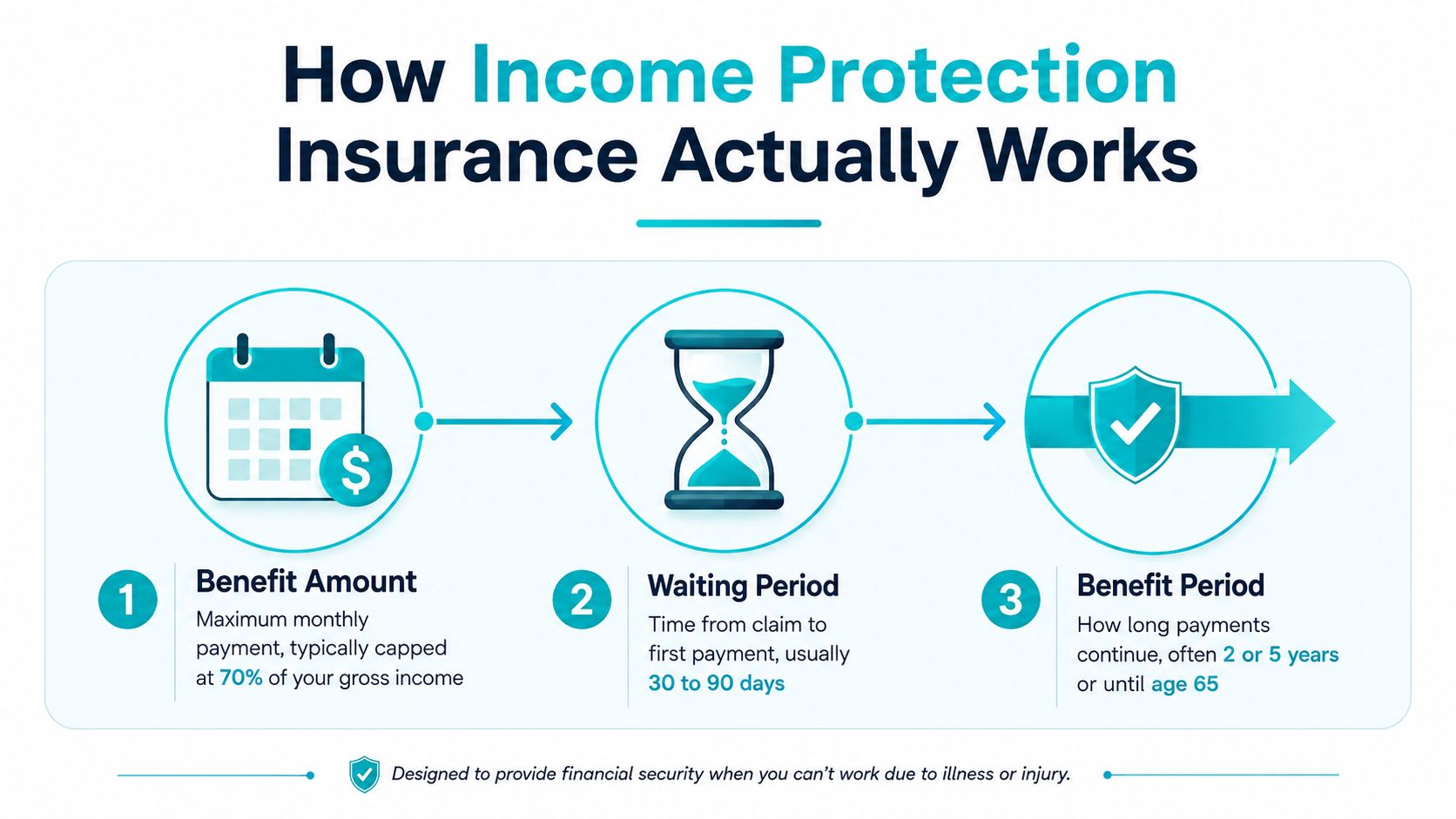
Income protection insurance acts as a financial safety net for any time your regular income is interrupted due to one of the reasons covered by the policy’s terms and conditions. Typically, the most common reasons for successful claims involve injury or illness. An official medical report will almost certainly be required to confirm that status.
Policies and their conditions can vary widely; however, the following is generally applicable:
Standard income protection insurance replaces up to 70% of your (pre-tax) income
Income Protection Insurance: Terms and Conditions
Private insurance providers must comply with the following:
Industry standards
Government regulations
Consumer protection laws
Each provider sets their own premium rates, eligibility criteria, and unregulated policy terms. Typically, successful applicants must be:
Permanent resident/citizen
Employed/self-employed (20-30 hours per week)
Aged 18-59
Individuals with certain stated occupations may be subject to stricter age restrictions and/or higher premiums.
Income Protection Insurance: Exemptions
Although these must be clarified with your potential providers during the ‘due diligence’ phase of sourcing and comparing quotes, most policies have the following caveats that automatically prevent any claim:
Suspension from duties
Pregnancy
Criminal activity
Self-harm
Acts of war
Can I Afford to Ignore Income Protection Insurance?
The decision whether or not to purchase income protection insurance depends on your personal circumstances. Some factors to consider include:
Fluctuating income/self-employment
Individuals with unstable incomes can experience significant financial issues if they lose their income due to illness or injury, especially the following:
Freelancers
Business owners
Contractors
Elevated living expenses/fiscal responsibilities
Individuals who should consider protecting themselves include those with:
Mortgages
Rent responsibilities
Financial dependents
Savings and emergency funds
Individuals who lack sufficient savings to cover expenses for an extended period must carefully consider the pros and cons of income protection.
Health, occupational, and lifestyle risks
Individuals working in physically demanding jobs, or those who enjoy activities and lifestyles that inherently carry higher health risks, should consider a policy.
Government support
Eligibility for workers’ compensation or other benefits is crucial to any decision about income protection.
Income Protection Insurance: Conclusion
All of us live in hope that we will never have to use insurance policies of any kind. They’re there to protect us when life doesn’t go according to plan, serving as a vital safety net that is hard to overstate.
It’s challenging to prioritise the policies we can’t afford to neglect. Hopefully, this article has highlighted how income protection insurance provides tangible protection for working individuals and families who rely on a primary source of income for everyday living.
Digital devices make learning easier than ever. Students can access online lectures, research materials, digital textbooks, and educational apps within seconds. However, the same devices can also interrupt concentration through social media notifications, text messages, games, and endless video recommendations. Learning how to avoid digital distractions while studying is therefore an important skill for students who want to make better use of their study time.
Even a quick check of your phone can turn into several minutes of scrolling. When this happens repeatedly, it becomes harder to stay focused, understand complex information, and finish assignments on time. The solution is not necessarily to stop using technology. Instead, students need to develop better digital habits and create an environment that supports focused learning.
In this guide, you will discover 12 practical ways to reduce digital distractions, improve concentration, and build a more productive study routine.
What Are Digital Distractions While Studying?
Digital distractions are interruptions caused by electronic devices, apps, websites, or online activities that take your attention away from an academic task.
Common examples include:
Checking social media while reading a textbook.
Replying to messages during an online lecture.
Watching unrelated videos when researching an assignment.
Switching between study tabs and entertainment websites.
Checking notifications whenever your phone makes a sound.
Playing mobile games during planned study sessions.
Technology itself is not always the problem. A laptop can be essential for writing an essay, and a smartphone can help you review flashcards. The difficulty arises when you use the same devices for learning and entertainment without clear boundaries.
Why Digital Distractions Affect Your Learning
When you switch between studying and unrelated digital activities, you interrupt the mental process needed to understand and remember information. After an interruption, you may need time to return to the original task and remember where you left off.
Frequent interruptions can also make study sessions feel longer without producing meaningful progress. For example, spending two hours at a desk does not necessarily mean you have completed two hours of focused learning.
Digital distractions may also contribute to procrastination. When an assignment feels difficult or boring, checking your phone offers an immediate and easy alternative. Repeating this behaviour can make it harder to begin challenging tasks.
The goal is not to eliminate every possible interruption. It is to reduce unnecessary distractions and make it easier to return your attention to learning.
12 Practical Ways to Avoid Digital Distractions While Studying
1. Turn Off Unnecessary Notifications
Notifications are one of the easiest ways for digital devices to interrupt your concentration. A message preview or social media alert can draw your attention away from a difficult question, even if you do not open the app.
Before studying, silence non-essential notifications on your phone, tablet, and computer. You can enable Do Not Disturb or Focus mode to limit interruptions during your planned study period.
Keep important calls or emergency contacts accessible if necessary. You do not need to disconnect from everyone; you simply need to decide which interruptions deserve your attention.
Practical tip: Activate Focus mode before opening your books or starting an online lesson.
2. Keep Your Phone Out of Reach
A phone lying beside your notebook can tempt you to check it whenever studying becomes challenging. Even without a notification, you might pick it up out of habit.
Place your phone in a bag, drawer, or another room while completing tasks that do not require it. If you need your phone for a learning app, place it on silent and open only the app you need.
Making your phone less accessible creates a small barrier between an impulse and an action. That extra step can help you stay focused.
3. Use Website and App Blockers
If you frequently visit distracting websites, consider using a website blocker or app-limiting feature. These tools can restrict access to selected platforms during your study sessions.
Choose the websites that distract you most, such as short-video platforms, gaming sites, or social media feeds. Set a realistic block period that matches your schedule.
Remember that blockers are support tools, not complete solutions. You still need a clear goal and a plan for what to do during your study time.
4. Set a Specific Goal Before Every Study Session
Vague goals make it easier to become distracted. If you tell yourself to study biology, you may not know where to begin or when the task is complete.
Instead, define a specific outcome before starting.
For example:
Read and summarize one chapter.
Complete ten mathematics problems.
Review 20 vocabulary flashcards.
Write the first two paragraphs of an essay.
Watch one lecture and make notes on its main ideas.
A clear target gives your attention a direction and helps you measure progress. It also reduces the temptation to browse unrelated content because you know exactly what you are trying to accomplish.
5. Study in Short, Focused Time Blocks
Long study sessions without breaks can become difficult to maintain, particularly when the material is demanding. Short, structured periods can make it easier to begin and sustain concentration.
Try this simple approach:
Choose one task.
Study for 25 minutes without unnecessary digital interruptions.
Take a five-minute break.
Repeat the cycle three or four times if appropriate.
Take a longer break after several focused sessions.
You can adjust the timing to suit your needs. Some students prefer 40-minute sessions, while others work better in shorter blocks.
During focused time, avoid switching to unrelated apps. During breaks, step away from your study materials rather than automatically opening social media.
6. Keep Only Essential Tabs and Apps Open
An overcrowded computer screen can encourage unnecessary browsing. Multiple open tabs make it easy to move from an academic article to news, entertainment, or shopping websites.
Before beginning, close unrelated tabs and applications. Keep only the resources required for your current task.
If you are writing an assignment, you might need a document, a course reading, and a reliable research source. You probably do not need several social media tabs open at the same time.
For online research, write down questions you need to answer. This helps you search with a purpose instead of clicking on every interesting link.
7. Use Active Learning Instead of Passive Browsing
Passive study methods can make it easier for your mind to wander. Reading the same paragraph repeatedly or watching a lecture without taking notes may leave you feeling busy without checking what you have actually learned.
Make your study sessions more interactive by using active learning techniques.
For example, you can:
Answer practice questions without looking at your notes.
Explain a concept in your own words.
Create flashcards and test yourself.
Summarize a chapter from memory.
Solve problems before checking the answers.
These activities give you something specific to do and help you monitor your understanding. They can also reduce the temptation to switch to unrelated digital entertainment.
8. Schedule Time for Social Media
Trying to avoid social media completely may be unrealistic for many students. A more manageable approach is to decide when you will use it.
Choose specific times to check messages or browse your favourite platforms. For example, you might check your messages during lunch and again after completing your evening study goals.
Keep these breaks separate from focused study blocks. If you find that a planned five-minute break regularly becomes 30 minutes, use an alarm or choose an activity that is easier to stop.
The aim is to use digital entertainment intentionally instead of allowing it to control your schedule.
9. Create a Dedicated Study Environment
Your physical surroundings can influence your digital habits. Studying in a busy room with television playing, several devices nearby, and constant notifications can make concentration more difficult.
Choose a study space where you can work comfortably. Keep your desk organised and place unnecessary devices away from your immediate workspace.
If you share a room, communicate your study times to the people around you when possible. Headphones or quiet background sounds may help reduce environmental noise, provided they do not become another distraction.
A dedicated study area can also help you build a routine. Over time, sitting in that space can become a signal that it is time to focus.
10. Recognise What Triggers Your Digital Distractions
Digital distractions are not always caused by notifications. Sometimes, students reach for their phones because they feel bored, tired, anxious, confused, or overwhelmed by an assignment.
Notice what happens just before you lose focus. Do you check social media when a question becomes difficult? Do you open videos when you are unsure how to start an essay?
Once you recognise the pattern, choose a better response.
If a task feels difficult, break it into smaller steps.
If you feel tired, take a genuine rest.
If you feel overwhelmed, write down your next action.
If you are curious about an unrelated topic, add it to a list to explore later.
Understanding your triggers helps you address the reason behind the distraction instead of relying on willpower alone.
11. Use Technology for Learning, Not Just Convenience
You do not need to avoid every digital tool. Instead, use technology in ways that support your academic goals.
Helpful options include digital calendars, flashcard apps, online dictionaries, note-taking software, and learning platforms. These tools can make studying more organised when used with a clear purpose.
However, avoid downloading multiple productivity apps if managing them takes more time than studying. Choose a small number of tools that meet your needs and learn to use them consistently.
Before opening an app or website, ask yourself: Does this help me complete my current study task? If the answer is no, leave it until later.
12. Review Your Progress at the End of Each Day
Building better digital habits takes practice. Instead of expecting perfect concentration immediately, review your progress regularly.
At the end of each study day, ask yourself:
What distracted me most today?
When did I concentrate most effectively?
Which strategy helped me stay on task?
Did I complete my main study goals?
What can I change tomorrow?
You can also track how often you check your phone or how many focused sessions you complete. Use this information to identify patterns, not to criticise yourself.
If one strategy does not work, try another. Gradual improvements are more sustainable than strict rules that are difficult to follow.
A Simple Daily Routine to Reduce Digital Distractions
Use the following routine as a starting point and adapt it to your classes, responsibilities, and energy levels.
Stage
What to do
Before studying
Write down your goals and silence unnecessary notifications.
First session
Work on your most important task without unrelated apps.
Short break
Stretch, drink water, or walk around briefly.
Second session
Continue studying using practice questions or active recall.
Planned digital break
Check messages or social media within a set time.
Final session
Complete remaining tasks and review key information.
End of day
Track progress and prepare tomorrow’s priorities.
Consistency matters more than following a perfect schedule. Start with one or two changes and add more as your routine becomes easier to maintain.
Common Mistakes to Avoid
When trying to reduce digital distractions, students sometimes make changes that are too strict or difficult to sustain.
Expecting perfect concentration: Everyone loses focus occasionally. The important skill is recognising the distraction and returning to the task.
Using your phone during every break: Constant screen use may make it harder to feel refreshed. Try movement, stretching, or a short walk instead.
Blocking useful educational websites: Restrict distracting platforms while keeping the resources necessary for coursework available.
Creating an unrealistic study schedule: A routine with no flexibility can lead to frustration. Allow time for meals, rest, unexpected tasks, and important messages.
Blaming yourself for every distraction: Review the situation and adjust your environment or task. Practical changes are often more helpful than self-criticism.
Frequently Asked Questions
How can I avoid digital distractions while studying at home?
Silence unnecessary notifications, keep your phone out of reach, close unrelated browser tabs, and choose a quiet study area. Set a specific goal for each session and take planned breaks to make your routine easier to maintain.
Should I turn off my phone while studying?
Turning it off can help if you do not need it for learning or important communication. Otherwise, silent mode, Focus mode, or placing it in another room may be sufficient. Choose the approach that reduces interruptions without creating unnecessary problems.
Are study apps helpful for avoiding digital distractions?
Study apps can help with scheduling, flashcards, time tracking, and website blocking. However, they are useful only when they support your learning goals. Avoid switching between too many apps or spending excessive time customising them.
How long should I study before taking a break?
Many students find that 25 to 50 minutes of focused work followed by a short break is manageable. The best interval depends on the task, your concentration, and your personal preferences. Experiment to find a routine you can maintain.
Why do I keep checking my phone even when I want to study?
You may have developed a habit of checking your phone whenever you feel bored, uncertain, or uncomfortable. Notifications and easy access can reinforce this behaviour. Make the phone less accessible, identify your triggers, and replace automatic checking with a planned action.
Can I listen to music while studying?
It depends on the task and your preferences. Instrumental music or quiet background sound may be suitable for some students, while lyrics or changing playlists can distract others. Test different options and notice which helps you complete work accurately.
Conclusion
Learning how to avoid digital distractions while studying does not mean giving up technology. It means using digital tools with intention and protecting the time you need for learning.
Start by turning off unnecessary notifications, keeping your phone out of reach, setting clear study goals, and working in focused time blocks. Then build on these habits by using active learning, scheduling digital breaks, and reviewing your progress.
You do not need to change every habit overnight. Choose two strategies today, practise them consistently, and adjust your routine as you learn what works best for you. With time and deliberate practice, you can build a more focused study environment, use your time more effectively, and make greater progress towards your academic goals.
Choosing between online learning and classroom learning is an important decision for students, parents, and educators. Both learning methods offer opportunities to gain knowledge, develop skills, and achieve academic goals, but they differ in how lessons are delivered, how students interact, and how learning fits into everyday life.
Understanding online learning vs classroom learning can help you decide which approach best matches your learning style, schedule, budget, and educational needs. Online learning offers flexibility and remote access, while traditional classroom learning provides face-to-face interaction, structured routines, and direct communication with teachers.
Neither method is automatically better for everyone. The right choice depends on the quality of teaching, the subject being studied, available resources, and how effectively a student engages with the learning process.
In this guide, we compare online and classroom learning, explain their advantages and disadvantages, and share practical tips for choosing the best option.
What Is Online Learning?
Online learning is an educational method in which students access lessons and learning materials through the internet. It can take place at home, in a library, or anywhere with a suitable device and internet connection.
Online courses may include recorded lectures, live video classes, digital assignments, online quizzes, discussion boards, and virtual group projects.
There are two common types of online learning:
Synchronous learning: Students and teachers meet online at the same scheduled time through live classes or video conferences.
Asynchronous learning: Students access recorded lessons and course materials and complete activities according to a flexible schedule, within set deadlines.
Some courses combine both methods, allowing students to attend live sessions while completing independent online activities.
What Is Classroom Learning?
Classroom learning, also called face-to-face or in-person learning, takes place in a physical educational environment such as a school, college, or university.
Students attend scheduled lessons, interact directly with teachers, participate in discussions, and work with classmates. Depending on the course, classroom learning may also involve laboratory experiments, demonstrations, presentations, and practical activities.
This approach provides a structured learning environment in which students can ask questions immediately, receive direct feedback, and develop relationships with teachers and peers.
Classroom learning can also use digital tools, such as interactive presentations and online assignments. The main difference is that teaching and learning activities take place primarily in person.
Online Learning vs Classroom Learning: Key Differences
The following table highlights the main differences between these two learning methods.
Feature
Online learning
Classroom learning
Location
Learn remotely
Attend a physical location
Schedule
Often flexible, depending on the course
Usually follows a fixed timetable
Teacher interaction
Through video calls, messages, and forums
Direct face-to-face communication
Student interaction
Virtual discussions and group activities
In-person discussions and collaboration
Learning environment
Requires a suitable personal study space
Provides a dedicated classroom
Technology
Depends on digital devices and internet access
May use digital tools alongside in-person teaching
Time management
Often requires strong independent planning
Provides more external structure
Practical activities
Virtual simulations or selected remote activities
Direct access to equipment and hands-on practice where available
Travel
Usually little or no commuting
May require daily travel
Learning resources
Often available through digital platforms
May include teachers, libraries, printed materials, and online resources
These differences can influence the student experience, but the quality of teaching and course design also plays an important role.
Advantages of Online Learning
Online education has become a useful option for students who need flexibility or cannot easily attend a physical campus.
1. Greater Flexibility
One of the biggest advantages of online learning is the ability to study around other responsibilities. Some courses allow students to access recorded lectures and complete coursework at convenient times.
This can be especially helpful for students who work part-time, manage family responsibilities, or live far from educational institutions.
However, flexibility does not mean there are no deadlines. Many online courses still require students to attend scheduled sessions, submit assignments on time, and complete examinations within specific periods.
2. Access to a Wider Range of Courses
Online learning can make educational opportunities available to students who do not live near a suitable school or university.
Depending on the provider, students may be able to access courses offered by institutions in other cities or countries without relocating.
This can expand the range of subjects and programmes available, although admission requirements, fees, language, and course recognition should be checked carefully.
3. Reduced Commuting Time
Studying online can reduce the time and money spent travelling to campus.
Students may be able to use that time for revision, assignments, employment, or rest. Online learning may also reduce some transport and accommodation expenses, depending on the course and the student’s circumstances.
4. Easy Access to Digital Resources
Online courses often provide recorded lectures, digital readings, downloadable notes, quizzes, and learning activities in one place.
Students can revisit available recordings or materials when they need to review a difficult topic. This can make revision more convenient, especially when the course is designed to support independent study.
Disadvantages of Online Learning
Despite its benefits, online learning also presents challenges that students should consider.
1. Greater Need for Self-Discipline
Without regular in-person classes, some students find it difficult to maintain a consistent study routine.
Household responsibilities, entertainment, social media, and other distractions can interfere with learning. Students may also postpone assignments if they do not plan their time effectively.
Creating a weekly schedule, setting realistic goals, and studying in focused sessions can help overcome these challenges.
2. Dependence on Technology
Online learning usually requires a suitable device, a reliable internet connection, and access to the necessary learning platform.
Technical problems can interrupt lessons, delay submissions, or make it difficult to participate in discussions. Students with limited internet access or unsuitable equipment may face additional barriers.
Before enrolling in an online course, check its technical requirements and identify alternative ways to access learning materials if problems occur.
3. Fewer Opportunities for Spontaneous Interaction
Although online courses can include live discussions and group activities, casual conversations with classmates and immediate face-to-face interaction may be less frequent.
Some students may feel isolated, particularly when most communication happens through messages or scheduled video calls.
Participating in online discussions, contacting instructors, and arranging collaborative study sessions can help students feel more connected.
Advantages of Classroom Learning
Traditional classroom learning remains valuable for students who benefit from direct interaction and a structured educational environment.
1. Immediate Feedback From Teachers
In a physical classroom, students can ask questions, request clarification, and discuss difficult concepts directly with their teachers.
Teachers can also notice confusion, respond to questions, and adjust explanations during a lesson.
This direct communication may be particularly helpful when students are learning unfamiliar concepts or need additional guidance.
2. Face-to-Face Social Interaction
Classroom learning gives students regular opportunities to communicate with classmates, share ideas, and work together.
Group discussions, presentations, and collaborative activities can help students develop communication, teamwork, and interpersonal skills.
These interactions may also help students build friendships and feel connected to their educational community.
3. A More Structured Routine
Scheduled classes provide an external structure that can help students organise their day.
Travelling to school or university, attending lessons, and following a timetable create regular learning routines. For students who struggle with procrastination, this structure can make it easier to stay engaged.
Classroom learning does not eliminate the need for independent study, but it can provide a clearer framework for managing academic responsibilities.
4. Hands-On Learning Opportunities
Some subjects require physical equipment, direct supervision, practical demonstrations, or access to specialised facilities.
Classroom-based education can provide laboratories, workshops, studios, and other environments where students practise skills under appropriate supervision.
Although online simulations and virtual demonstrations can be useful, they may not fully replace every practical learning experience.
Disadvantages of Classroom Learning
In-person education also has limitations that may affect students differently.
1. Less Scheduling Flexibility
Traditional classes usually follow fixed schedules. Students must attend lessons at particular times, which can make it more difficult to combine education with employment, family responsibilities, or other commitments.
Missing a class may also mean missing explanations or activities that are not available later.
2. Commuting and Additional Expenses
Students who attend physical classes may need to pay for transport, meals, accommodation, or other campus-related costs.
Travel can also consume time that could otherwise be used for study or rest. The impact depends on the distance to campus and the resources available to the student.
3. Different Learning Paces
A classroom teacher generally needs to manage the progress of a group. Some students may understand a concept quickly, while others need more time or additional explanation.
Although teachers can offer support, the pace of a scheduled lesson may not always match every student’s needs.
Students can address this by asking questions, attending support sessions, reviewing notes, and completing additional practice outside class.
Which Is Better: Online Learning or Classroom Learning?
There is no universal answer to the question of which learning method is better. The most suitable option depends on your circumstances and the requirements of your course.
Online learning may suit you if:
You need flexibility around work or family responsibilities.
You are comfortable using digital learning platforms.
You can organise your time independently.
You have reliable access to the required technology.
You prefer reviewing recorded lessons or digital materials when available.
Classroom learning may suit you if:
You benefit from direct interaction with teachers.
You prefer a structured daily routine.
You learn well through in-person discussion and collaboration.
Your subject requires hands-on practice or specialised facilities.
You find it easier to concentrate in a dedicated learning environment.
Your preferred learning style is important, but practical considerations also matter. Check the course’s teaching quality, assessment methods, costs, schedule, and available student support before making a decision.
Is Online Learning as Effective as Classroom Learning?
Online learning can be effective when courses are well designed and students receive appropriate teaching, feedback, and support. Classroom learning can also produce strong outcomes when lessons meet students’ needs and encourage active engagement.
Research comparing the two approaches does not support a simple rule that one format always produces better results. Outcomes vary depending on factors such as course design, subject, student circumstances, and the quality of instruction.
For example, a well-organised online course with interactive lessons and regular feedback may be more useful than an in-person course with limited student engagement. Similarly, a practical subject may benefit from classroom facilities that are difficult to reproduce online.
The important question is not only where learning happens, but also how well the learning experience supports understanding, practice, feedback, and progress.
What Is Blended Learning?
Blended learning combines online learning with face-to-face instruction. Students may attend classroom sessions while also using digital platforms for readings, quizzes, recorded lectures, or independent assignments.
For example, a university course might include weekly classroom discussions alongside online revision activities. Students can benefit from direct teacher interaction while using digital resources to review material independently.
Blended learning can offer a balance between flexibility and personal interaction. However, its effectiveness depends on how well the online and in-person activities work together.
A course should have clear learning goals and use each format for activities that suit it best, rather than simply adding technology without a clear purpose.
How to Succeed in Either Learning Environment
Regardless of whether you choose online learning or classroom learning, several habits can support your academic progress.
Set clear goals: Identify what you need to learn and break larger goals into manageable tasks.
Create a study schedule: Set aside regular time for lessons, revision, and assignments.
Participate actively: Ask questions, contribute to discussions, and seek clarification when necessary.
Review material regularly: Revisit important concepts instead of relying entirely on last-minute revision.
Manage distractions: Put away unnecessary devices and choose a suitable study environment.
Seek feedback: Use comments from teachers and assessments to identify areas for improvement.
Protect your wellbeing: Make time for sleep, exercise, breaks, and personal responsibilities.
Consistency is often more useful than relying on occasional long study sessions. Choose habits that you can maintain throughout the course.
Frequently Asked Questions
What is the main difference between online learning and classroom learning?
The main difference is the learning environment. Online learning uses digital platforms to deliver lessons remotely, while classroom learning takes place in person. The formats also differ in scheduling, interaction, access to facilities, and the amount of independent planning students may need.
Is online learning cheaper than classroom learning?
It can be, particularly when it reduces commuting or accommodation expenses. However, online courses may still have tuition fees, technology costs, and other expenses. Compare the full cost of each option before deciding.
Which learning method is better for school students?
The best option depends on the student’s age, learning needs, available support, access to technology, and course requirements. Some students benefit from the structure of classroom learning, while others may thrive in a well-supported online environment.
Can online learning improve time management skills?
Yes. Online learning can encourage students to plan their schedules, meet deadlines, and organise independent study. However, students need to practise these skills consistently because a flexible schedule can also make procrastination easier.
What is the difference between online learning and blended learning?
Online learning delivers teaching primarily through digital platforms. Blended learning combines online activities with face-to-face instruction, allowing students to learn through both formats.
Conclusion
The comparison of online learning vs classroom learning shows that each approach has distinct advantages and limitations. Online learning offers flexibility, remote access, and convenient digital resources, while classroom learning provides direct interaction, structured routines, and opportunities for practical activities.
Neither option is automatically the best choice for every student. Your decision should reflect your schedule, learning needs, available resources, educational goals, and the requirements of your course.
If both options are available, compare their teaching quality, student support, assessment methods, and overall costs before enrolling. Most importantly, stay engaged, manage your time effectively, and review your progress regularly.
With the right learning environment and consistent study habits, you can develop valuable skills and work towards your academic goals in either format.
Artificial intelligence (AI) tools are changing how students research topics, practise new skills, organise assignments, and prepare for examinations. When used thoughtfully, these tools can make learning more accessible and help students understand difficult concepts. However, using AI without checking its answers or following school rules can create problems with accuracy, academic integrity, and independent learning.
Understanding responsible AI use for students means knowing when AI can help, when it should not be used, and how to remain responsible for your own work. AI should support your learning process rather than replace your thinking, creativity, or effort.
In this guide, you will learn how to use AI tools responsibly for schoolwork, avoid common mistakes, protect your privacy, and make better decisions when completing assignments and preparing for exams.
What Is Responsible AI Use for Students?
Responsible AI use means using artificial intelligence in ways that are honest, safe, appropriate, and supportive of learning. It involves following your school’s rules, checking information before relying on it, respecting other people’s work, and being transparent about AI assistance when required.
AI tools can explain unfamiliar topics, suggest study questions, help organise ideas, and provide feedback on writing. However, they can also produce incorrect information, invent references, misunderstand instructions, or give answers that sound convincing but are not supported by evidence.
Students should therefore treat AI as a learning assistant rather than an unquestionable authority.
The goal is to use technology to improve understanding while ensuring that submitted work reflects your own knowledge and abilities.
1. Understand Your School’s AI Policy Before Using AI
The first step in responsible AI use for students is understanding what your teacher or school permits.
Different assignments may have different rules. A teacher might allow AI for brainstorming or grammar feedback but prohibit AI-generated answers in a test or a particular writing assignment.
Before using an AI tool, check:
Your assignment instructions and assessment criteria
Your school’s academic integrity policy
Whether AI assistance is permitted for the task
Whether you must acknowledge or cite AI use
Whether there are restrictions on particular tools or features
If the instructions are unclear, ask your teacher before using AI.
Do not assume that because a tool is publicly available, it is automatically permitted for every school assignment. Following the rules protects your academic integrity and helps you understand what your teacher expects you to learn.
2. Use AI to Understand Difficult Concepts
One of the most useful ways to use AI responsibly is to ask it to explain concepts you find confusing.
For example, if you are studying photosynthesis, algebra, or a historical event, you can ask an AI tool for a simpler explanation, a step-by-step breakdown, or an example suitable for your level.
Try prompts such as:
“Explain this concept in simple language for a secondary school student.”
“Give me an example that helps me understand this topic.”
“Explain the difference between these two ideas.”
“Ask me questions to check whether I understand this lesson.”
After reading the explanation, compare it with your textbook, class notes, and teacher’s instructions.
Avoid simply copying an explanation into your assignment. Instead, make sure you understand the idea well enough to describe it in your own words.
3. Use AI for Brainstorming, Not for Replacing Your Ideas
AI can help you get started when you are unsure how to approach an assignment. It can suggest possible topics, questions to investigate, or ways to organise your ideas.
For example, if you need to write an essay about environmental protection, you could ask AI to suggest several possible angles. You can then choose a topic that interests you, research it independently, and develop your own argument.
A responsible brainstorming process looks like this:
Identify the assignment question.
Generate possible ideas with AI if permitted.
Evaluate which ideas are relevant and useful.
Research the topic using credible sources.
Develop your own argument and structure.
Write the assignment according to your school’s rules.
Your own judgement should guide the final result. Do not assume that every AI suggestion is original, accurate, or appropriate for your assignment.
4. Improve Your Writing Without Losing Your Own Voice
AI tools can sometimes help students identify grammar errors, improve sentence clarity, and organise paragraphs.
If your teacher permits this type of assistance, you might ask an AI tool to identify unclear sentences or explain why a paragraph is difficult to follow.
For example, you could ask:
“Review this paragraph for grammar and clarity. Explain the changes you recommend, but do not rewrite the entire paragraph.”
This approach helps you learn from feedback instead of simply accepting a finished answer.
Always make sure the final writing reflects your understanding and follows the assignment requirements. If AI-generated rewriting is prohibited or requires disclosure, follow those instructions.
Learning to express your own ideas clearly is an important academic skill, so avoid relying on AI to write every paragraph for you.
5. Check AI-Generated Information Before Using It
AI tools can produce incorrect dates, misleading explanations, outdated facts, and references that do not exist. This is why fact-checking is essential.
Before using AI-generated information in schoolwork, compare it with reliable sources such as textbooks, academic publications, official educational websites, and trusted reference materials.
Pay particular attention to:
Statistics and numerical claims
Historical dates and events
Scientific explanations
Quotations and attributed statements
Names of researchers and publications
References and website details
If AI suggests a source, find the original publication and confirm that it supports the claim you want to make.
Do not cite a source simply because an AI tool recommended it. Read the original material and follow your school’s referencing requirements.
6. Protect Your Privacy When Using AI Tools
Responsible AI use also involves protecting your personal information.
Before entering information into an AI tool, consider whether it is necessary and whether you have permission to share it. Depending on the service and its settings, information entered into a tool may be stored or processed according to its privacy practices.
Avoid entering sensitive information such as passwords, student identification numbers, private contact details, personal records, or confidential school documents.
Be especially careful when working with information about classmates, teachers, or other people. Do not upload someone else’s private information without appropriate permission.
If your school provides an approved AI tool, review its guidance on privacy and acceptable use.
Developing good privacy habits now can help you use digital tools more safely throughout your education.
7. Be Honest About AI Assistance
Academic integrity means being truthful about how your work was completed.
If your teacher requires you to disclose AI assistance, provide the requested information accurately. Depending on the assignment rules, you may need to identify the tool, explain how you used it, or include a citation or acknowledgement.
For example, if AI was permitted for brainstorming, your teacher might ask you to state that you used it to generate initial topic ideas.
Keep a record of important prompts and outputs when your course requires this or when it helps you document your process.
Never present AI-generated work as entirely your own if doing so violates your school’s rules or misrepresents your contribution.
Transparency helps teachers assess your learning fairly and allows you to demonstrate that you understand the work you submit.
8. Use AI to Create Better Study Plans and Practice Questions
AI can support independent learning by helping you organise your revision and practise important concepts.
You could ask an AI tool to create a revision schedule based on your examination dates, suggest practice questions about a topic, or quiz you on information from your notes.
For example, try prompts such as:
“Create a five-day revision plan for these topics.”
“Ask me ten questions about this lesson, one at a time.”
“Give me a practice problem and explain the solution after I attempt it.”
“Help me identify which topics I should revise based on my incorrect answers.”
Attempt the questions before viewing the answers. This helps you test your understanding rather than passively reading AI-generated explanations.
You should also check that the questions match your syllabus and the difficulty level of your course.
9. Avoid Becoming Too Dependent on AI
Although AI can save time, using it for every task may prevent you from developing important academic skills.
If you ask AI to solve every mathematics problem, write every essay, or summarise every chapter without studying the original material, you may struggle when you need to work independently.
Try the following approach:
Attempt the task yourself first.
Use AI to clarify a specific difficulty if permitted.
Review the explanation and identify what you learned.
Complete a similar task without assistance.
Check your understanding against trusted learning materials.
This method allows you to benefit from technology while continuing to develop critical thinking, problem-solving, research, and writing skills.
Remember that completing an assignment is not the only goal. The learning you gain from completing it is equally important.
10. Recognise Bias and Limitations in AI Responses
AI systems may produce incomplete answers or reflect biases in their training data. They can also present one viewpoint more confidently than the evidence justifies.
When exploring a complex issue, do not automatically accept the first answer you receive.
Ask yourself:
Is the information supported by evidence?
Are important viewpoints missing?
Does the response distinguish facts from opinions?
Is the information relevant to my assignment?
Can I verify the main claims independently?
For topics involving history, culture, society, or current events, consult multiple credible sources and consider the context behind different perspectives.
Critical evaluation helps you make informed decisions instead of allowing an AI tool to make them for you.
11. Use AI Respectfully and Fairly
Responsible AI use includes respecting copyright, privacy, and the work of other people.
Do not use AI to impersonate classmates, create misleading information about others, or produce harmful content. Avoid uploading copyrighted course materials or confidential information unless you have permission and the tool is approved for that use.
If you use AI-generated text, images, or other material, follow the relevant assignment rules and any applicable attribution requirements.
Also consider whether AI assistance gives you an unfair advantage in an assessment where independent work is required.
Using AI responsibly means thinking beyond convenience and considering how your choices affect your classmates, teachers, and learning community.
A Simple Checklist for Responsible AI Use
Before submitting an assignment that involved AI, ask yourself:
Have I checked my teacher’s rules about AI use?
Did I use AI for a permitted purpose?
Have I verified facts and references independently?
Do I understand the ideas included in my work?
Does the submitted work reflect my own contribution?
Have I acknowledged AI use if required?
Have I protected personal and confidential information?
Can I explain my reasoning without relying on AI?
If you cannot answer yes to an important question, review the relevant issue before submitting your work.
Frequently Asked Questions
What is responsible AI use for students?
Responsible AI use for students means using AI tools honestly, safely, and in accordance with school rules. It includes checking information, protecting privacy, acknowledging AI assistance when required, and ensuring that your work reflects your own learning.
Is it acceptable to use AI for school assignments?
It depends on your teacher’s instructions and your school’s academic integrity policy. Some assignments allow AI for brainstorming or feedback, while others restrict or prohibit it. Always check the rules before using AI.
Can AI help students study for examinations?
Yes. When permitted, AI can help explain difficult concepts, generate practice questions, organise revision schedules, and quiz students on course material. Students should verify explanations and practise answering questions independently.
Should students cite AI-generated content?
Follow your teacher’s and school’s requirements. Some institutions require acknowledgement or citation when AI contributes to submitted work. Others have different rules depending on the type of assistance. Ask your teacher if you are uncertain.
What are the risks of using AI for schoolwork?
Potential risks include incorrect information, fabricated references, privacy problems, academic integrity violations, biased answers, and overdependence on technology. Checking outputs and following school policies can help reduce these risks.
Conclusion
Learning how to use AI tools responsibly for schoolwork can help you become a more independent, confident, and effective student. AI can support research, explain difficult topics, improve study planning, and provide feedback, but it should not replace your own thinking or effort.
By following these responsible AI use for students principles, you can use technology ethically, verify information, protect your privacy, and maintain academic integrity.
Start by checking your school’s rules, use AI for clearly defined learning purposes, and review every important answer before relying on it. When used thoughtfully, AI can become a valuable learning assistant while you continue building the skills needed for long-term academic success.
The good news is that classroom participation is a skill you can develop with practice. You do not need to be the loudest person in the room or answer every question to become an active participant. Listening carefully, asking thoughtful questions, sharing ideas, and contributing to group activities are all valuable ways to participate.
In this guide, you will discover classroom participation tips for students that can help you feel more comfortable, contribute meaningfully to discussions, and get more out of your education.
What Is Classroom Participation?
Classroom participation refers to the ways students actively engage with lessons, teachers, and classmates. It includes more than answering questions or speaking during discussions.
Examples of classroom participation include:
Asking questions when a topic is unclear.
Answering questions asked by the teacher.
Sharing opinions and supporting them with evidence.
Listening carefully to classmates.
Taking part in group activities and presentations.
Providing constructive feedback.
Contributing to online classroom discussions.
Taking notes and responding to learning activities.
Effective participation is about contributing to learning, not simply talking more often. A thoughtful question or a relevant comment can be just as valuable as a long explanation.
Why Is Classroom Participation Important?
Active classroom participation can make learning more engaging and help you identify gaps in your understanding.
Improves understanding: Asking questions and discussing ideas can help you clarify difficult concepts before they become bigger problems.
Builds confidence: Regularly sharing your thoughts can make speaking in academic settings feel more comfortable over time.
Develops communication skills: Classroom discussions help you practise explaining ideas, listening to others, and responding respectfully.
Encourages critical thinking: Discussing different viewpoints helps you examine evidence, evaluate arguments, and consider alternative explanations.
Strengthens relationships: Participating in group activities can help you connect with classmates and teachers.
Supports academic development: Engaging with course material during lessons can help you recognise what you understand and what needs further study.
Remember that participation expectations vary between courses. Some classes focus on discussions, while others use practical exercises, group projects, written responses, or online activities.
12 Classroom Participation Tips for Students
1. Prepare Before Attending Class
One of the most effective classroom participation tips for students is to prepare before each lesson. When you understand the basic topic, it becomes easier to follow the discussion and contribute relevant ideas.
Before class, review your previous notes and read any assigned material. Identify the main concepts and write down anything you find confusing.
Prepare two or three questions or observations related to the topic. You do not need to know every detail in advance. Even a basic understanding gives you a starting point for discussion.
For example, if your next lesson covers climate change, you could prepare a question about its causes, effects, or possible solutions.
A few minutes of preparation can make you feel more ready to participate.
2. Start by Asking Simple Questions
You do not have to begin with a complicated question or an impressive answer. Simple questions are often an excellent way to become more involved in classroom discussions.
If you do not understand a concept, ask your teacher to explain it again. If you understand the material but want to learn more, ask for an example or clarification.
You can use phrases such as:
“Could you explain that concept in another way?”
“Can you give us an example of how this works?”
“How does this idea relate to the previous lesson?”
“Could you clarify the difference between these two concepts?”
Asking questions helps you learn while showing that you are actively thinking about the lesson.
3. Set a Small Participation Goal
If you rarely speak in class, trying to contribute several times in one lesson may feel overwhelming. Instead, set a small, achievable goal.
For example, aim to ask one question, share one idea, or contribute to one group discussion during each class.
Once this becomes more comfortable, gradually increase your participation. You might begin by speaking during small-group activities before sharing your thoughts with the entire class.
Track your progress for a few weeks. Focus on improvement rather than comparing yourself with classmates who may already be comfortable speaking publicly.
Small, consistent steps can help you build a sustainable participation habit.
4. Listen Carefully to Your Teacher and Classmates
Classroom participation is not only about speaking. Active listening is equally important because it helps you understand the discussion and respond thoughtfully.
Pay attention when your teacher explains a concept or a classmate shares an opinion. Avoid planning your response while ignoring what the other person is saying.
Take brief notes on important ideas, examples, and questions that arise during the lesson.
You can demonstrate active listening by maintaining appropriate eye contact, nodding when relevant, and responding directly to the points being discussed.
For example, you might say, “I understand your point about time management. I think prioritising difficult tasks could also help.”
Listening carefully makes your contributions more relevant and encourages respectful classroom discussions.
5. Overcome the Fear of Giving a Wrong Answer
Fear of making mistakes is a common reason students avoid participating. You might worry that classmates will judge your answer or that your teacher will think you have not studied.
However, classroom discussions are opportunities to learn, not tests of perfection. A reasonable attempt can help you discover what you understand and where you need clarification.
Before answering, take a breath and organise your main idea. You can begin with phrases such as “I think the answer might be…” or “Based on what we discussed, I would suggest…”
If your answer is incorrect, listen to the feedback and use it to improve your understanding.
You are not expected to know everything. Being willing to think, ask questions, and learn from mistakes is an important part of academic development.
6. Share Your Ideas Clearly and Concisely
You do not need a long speech to make a useful contribution. A clear, relevant comment can add value to a discussion.
Before speaking, identify the main point you want to communicate. If necessary, support it with a reason, example, or piece of evidence.
A simple structure is:
State your main idea.
Explain why you think it is important.
Give an example or supporting reason.
For instance, in a discussion about healthy study habits, you might say, “I think reviewing notes after class is useful because it helps students identify confusing topics early. For example, they can ask their teacher for clarification before the examination.”
Practising this structure can help you organise your thoughts and communicate more confidently.
7. Participate in Small-Group Discussions
If speaking in front of the entire class makes you nervous, start with smaller groups. Pair discussions and group activities provide opportunities to practise expressing your ideas in a less intimidating setting.
Listen to your group members, share your thoughts, and ask follow-up questions. You can also volunteer to summarise the group’s conclusions or present one of its main ideas.
These activities help you develop communication skills while learning how to collaborate with others.
As your confidence grows, you may find it easier to contribute during whole-class discussions.
8. Build on What Other Students Say
A classroom discussion becomes more meaningful when students respond to one another instead of treating every question as a separate conversation with the teacher.
Listen for ideas you can agree with, question respectfully, or develop further.
Useful phrases include:
“I agree with that point because…”
“I would like to add another example.”
“That is an interesting perspective. Could we also consider…?”
“I understand your argument, but I see another possibility.”
Respectful disagreement is also valuable when you explain your reasoning and focus on the idea rather than criticising the person.
Building on others’ contributions shows that you are listening and thinking critically about the topic.
9. Improve Your Academic Vocabulary
Sometimes students understand a topic but struggle to explain their ideas because they cannot find the right words.
To improve, keep a list of useful academic terms from your lessons and readings. Write down their meanings and practise using them in sentences.
Pay attention to words your teacher uses to compare, explain, evaluate, and describe ideas. These terms can help you communicate more precisely.
If English is not your first language, you can prepare a few key phrases before class. You can also practise explaining concepts aloud at home.
You do not need perfect grammar or an advanced vocabulary to participate. Clear communication and a willingness to contribute matter more than using complicated words.
10. Reduce Classroom Anxiety With Simple Techniques
Feeling nervous before speaking is normal, especially when you are unfamiliar with the class or teacher.
To manage this anxiety, prepare your thoughts in advance and take a slow breath before speaking. Focus on the point you want to communicate rather than imagining how everyone might judge you.
Try to make your first contribution early in the lesson. Waiting until the end can sometimes make the task feel more intimidating.
You can also practise answering questions aloud when studying alone or discuss topics with a trusted classmate.
If anxiety consistently prevents you from participating, consider speaking privately with your teacher or a student support professional. They may be able to suggest manageable ways to contribute.
11. Participate in Online Classes Too
Classroom participation also matters in virtual learning environments. Online students can contribute through live discussions, chat messages, discussion boards, polls, and collaborative documents.
Before an online lesson, test your equipment and review the topic. Keep your notes nearby so you can organise your thoughts quickly.
If you are uncomfortable speaking through a microphone, use the chat feature when permitted. You can ask questions, respond to classmates, or share relevant examples.
Follow your instructor’s expectations for using microphones, cameras, and discussion tools. Avoid multitasking during lessons, as distractions can make it harder to follow the discussion.
Online participation provides different ways to engage, so choose an appropriate method that helps you contribute meaningfully.
12. Reflect on Your Progress After Each Class
Improving classroom participation requires practice and reflection. After a lesson, take a minute to consider what went well and what you could improve next time.
Ask yourself:
Did I ask a question or share an idea?
Did I listen carefully to other students?
Was there a moment when I wanted to speak but hesitated?
What could help me participate more comfortably next time?
You do not need to criticise yourself for every missed opportunity. Instead, identify one practical action for your next class.
For example, you might decide to prepare two questions beforehand or contribute once during a group discussion.
Regular reflection helps you recognise progress and develop strategies that suit your personality and learning environment.
A Simple 7-Day Plan to Improve Classroom Participation
Use this short plan to begin building your confidence.
Day
Practice activity
Day 1
Review your notes and prepare two questions before class.
Day 2
Ask one question when you need clarification.
Day 3
Share an idea during a pair or group discussion.
Day 4
Practise explaining a concept aloud for two minutes.
Day 5
Respond respectfully to a classmate’s contribution.
Day 6
Reflect on your progress and identify one challenge.
Day 7
Set a realistic participation goal for the following week.
Adapt the plan to your timetable and the participation opportunities available in your courses. The purpose is to practise consistently, not to force yourself to speak when you have nothing useful to contribute.
Common Classroom Participation Mistakes to Avoid
As you work on improving participation, avoid these common mistakes:
Speaking without listening: Pay attention to the discussion before responding.
Worrying about perfection: Focus on communicating a thoughtful idea rather than giving a flawless answer.
Interrupting classmates: Wait for an appropriate moment and respect other viewpoints.
Talking too much: Leave space for other students to contribute.
Remaining silent when confused: Ask questions before misunderstandings grow.
Comparing yourself with others: Set goals based on your own progress.
Ignoring non-verbal participation: Listening, taking notes, and engaging with activities are also valuable.
The goal is to contribute constructively while helping create a respectful learning environment for everyone.
Frequently Asked Questions
How can I improve classroom participation if I am shy?
Start by preparing questions before class and contributing during pair or small-group activities. Set a small goal, such as sharing one idea per lesson, and gradually build your confidence through practice.
What are the best classroom participation tips for students?
The most useful strategies include preparing before class, asking questions, listening actively, sharing ideas clearly, joining group discussions, and reflecting on your progress. Choose the strategies that address your biggest challenges.
Does classroom participation mean speaking in every lesson?
Not necessarily. Participation expectations vary by course. Speaking is one way to contribute, but active listening, group work, written responses, and online discussion activities may also count. Check your instructor’s guidelines.
How can I participate without feeling nervous?
Prepare your ideas in advance, begin with small contributions, and remind yourself that mistakes are part of learning. Focus on communicating your point rather than trying to impress everyone in the room.
Can classroom participation help academic performance?
Active participation can help you clarify concepts, identify gaps in understanding, and practise critical thinking. However, academic results also depend on factors such as preparation, independent study, assessment requirements, and the quality of your work.
Conclusion
Improving classroom participation does not mean becoming the most talkative student in your class. It means engaging with lessons, asking questions, listening carefully, sharing ideas, and contributing to a positive learning environment.
By following these classroom participation tips for students, you can gradually develop confidence, strengthen communication skills, and become more involved in your learning.
Start with one manageable goal, prepare before class, and practise contributing regularly. Remember that meaningful participation is about learning and exchanging ideas, not being perfect.
With consistent effort, you can become a more confident participant and make your classroom experience more productive.